As front-end developers, we constantly switch between our code editor and browser DevTools. We inspect elements, adjust spacing values, experiment with flexbox alignments, modify typography, and then manually transfer those changes back into our codebase.
While this workflow works, it's rarely efficient.
What if you could visually edit layouts directly on a live webpage, adjust spacing with sliders, experiment with flexbox settings through dropdowns, and instantly generate production-ready Tailwind CSS classes?
That's exactly why I built Tailwind CSS Sandbox Max.
The Problem with Traditional Styling Workflows
Modern UI development often involves a repetitive cycle:
- Open DevTools
- Inspect an element
- Modify CSS properties
- Copy values
- Return to your editor
- Rewrite everything as Tailwind utility classes
- Refresh and repeat
This process becomes even more time-consuming when you're experimenting with layouts or exploring design variations.
Developers need a faster way to prototype and iterate without constantly leaving the browser.
What is Tailwind CSS Sandbox Max?
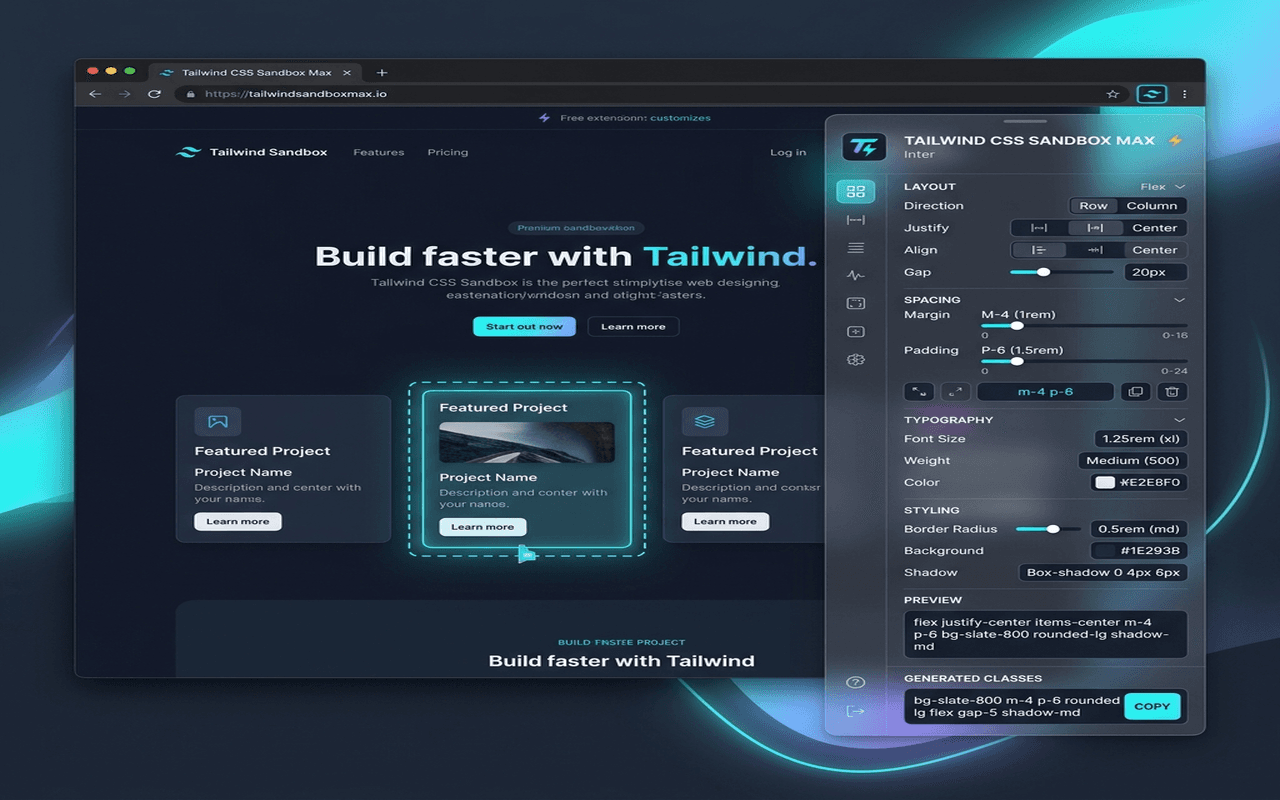
Tailwind CSS Sandbox Max is a Chrome Extension that transforms any webpage into an interactive design playground.
Instead of manually editing styles through browser developer tools, the extension allows you to visually manipulate elements using an intuitive sidebar interface. Every change is reflected immediately on the page, giving you instant visual feedback.
Whether you're refining spacing, testing typography, or restructuring a flex layout, the entire process happens in real time.
Core Features
Point-and-Click Element Selection
After activating the extension, simply hover over any page element.
A subtle blue overlay highlights the current target, making it easy to identify exactly what you're editing.
Click once to lock the selection and open the editing panel.
This eliminates the need to navigate complex DOM trees in DevTools.
Visual Margin & Padding Controls
Spacing is one of the most frequently adjusted aspects of UI design.
Tailwind CSS Sandbox Max provides dedicated sliders for:
- Margin (
m-*) - Padding (
p-*)
Instead of guessing values or repeatedly editing utility classes, you can drag sliders and instantly observe how components respond.
Cards, buttons, containers, and typography blocks update live as you experiment.
Flexbox Layout Builder
Building responsive layouts becomes significantly easier with visual controls.
The extension provides dropdown selectors for:
- Flex Direction (
row,column) - Justify Content
- Align Items
When necessary, the tool automatically applies display: flex, allowing you to focus on design rather than implementation details.
This makes it incredibly useful for rapidly testing navigation bars, card layouts, content sections, and dashboard interfaces.
Typography Controls
Text often looks different in production than it does in mockups.
Tailwind CSS Sandbox Max allows developers to experiment with typography directly on real content.
Adjust:
- Font Size (
text-xs→text-4xl) - Font Weight (
font-thin→font-extrabold)
This helps validate readability, hierarchy, and visual balance before committing changes to your codebase.
Live Content Editing
Design isn't only about styles—content matters too.
The extension allows you to modify the actual text content of selected elements.
This is especially useful when:
- Testing longer headings
- Experimenting with button labels
- Evaluating responsive behavior
- Checking content overflow
Instead of imagining how content changes might affect the layout, you can see the results immediately.
Tailwind Play CDN Integration
One challenge with browser-based editing tools is that not every website uses Tailwind CSS.
To solve this, Tailwind CSS Sandbox Max dynamically injects the official Tailwind Play compiler when initialized.
This enables Tailwind utility classes to be applied and rendered on virtually any webpage, regardless of the technology stack behind it.
As a result, you can experiment freely without requiring Tailwind to already exist on the page.
One-Click Export Options
Once you've finalized your design adjustments, exporting the results takes only a single click.
Available export options include:
Copy Tailwind Classes
Generate and copy the final Tailwind utility class list directly to your clipboard.
Perfect for pasting into:
- React Components
- Next.js Applications
- Vue Projects
- Static HTML Templates
Copy HTML Markup
Export the modified element as updated outerHTML.
This allows developers to transfer both structure and styling changes into production code with minimal effort.
Technical Architecture
The extension is built using modern Chrome Extension standards and follows Manifest V3 best practices.
Manifest V3 Service Workers
Background processes are handled through service workers, providing a secure and efficient architecture.
ActiveTab Permissions
Rather than requesting access to all websites, the extension uses Chrome's activeTab permission model.
This grants temporary access only when the user explicitly activates the extension, reducing security concerns and improving trust.
Dynamic Script Injection
Using the scripting API, required assets are injected only when necessary.
This approach keeps resource usage low and avoids unnecessary overhead on pages where the extension isn't being used.
Defensive CSS Namespacing
All extension-generated UI components use a dedicated namespace:
.tw-sandbox-*
This prevents style conflicts with host websites and ensures the editor interface remains consistent across different environments.
Why I Built It
I wanted a tool that combined the convenience of visual page builders with the flexibility of Tailwind CSS.
Most browser-based editors either focus solely on CSS manipulation or generate bloated code. My goal was to create a lightweight workflow that helps developers:
- Prototype layouts faster
- Experiment without touching source code
- Generate clean Tailwind utilities
- Validate design ideas directly on real websites
The result is Tailwind CSS Sandbox Max—a browser-based playground designed specifically for modern front-end workflows.
Getting Started
Getting up and running takes only a few minutes:
- Download the extension source files.
- Open
chrome://extensions/. - Enable Developer Mode.
- Click Load Unpacked.
- Select the extension folder.
- Open any webpage.
- Click the extension icon and begin editing.
No build process. No external services. Just instant visual editing directly inside your browser.
Final Thoughts
As front-end development continues to move toward component-driven workflows and utility-first styling, rapid experimentation becomes increasingly important.
Tailwind CSS Sandbox Max bridges the gap between design exploration and implementation by allowing developers to visually edit layouts, test ideas, and generate Tailwind-ready code without leaving the browser.
If you've ever spent hours jumping between DevTools and your editor, this extension was built for you.