In today's digital world, browser security is more important than ever. Whether you're working from home, sharing a family computer, studying in a library, or accessing sensitive accounts at work, leaving your browser unattended can expose personal information to unauthorized users.
That's where Google Chrome Profile Lock comes in.
Google Chrome Profile Lock is a powerful Chrome extension designed to add an extra layer of protection to your browser. With password protection, automatic locking, website security controls, and privacy-focused features, it helps ensure that only you can access your Chrome session.
In this guide, we'll explore how Profile Lock works, its key features, and why it's becoming an essential browser security tool for Chrome users.
Why Browser Security Matters
Most people secure their devices with passwords, PINs, or biometric authentication. However, once a computer is unlocked, anyone with physical access can often open Chrome and gain access to:
- Email accounts
- Social media profiles
- Banking websites
- Business dashboards
- Saved passwords
- Personal browsing history
- Sensitive documents and web applications
This creates a significant privacy risk, especially on shared or public computers.
Google Chrome Profile Lock helps close this security gap by allowing users to lock their browser profile with a password.
What Is Google Chrome Profile Lock?
Google Chrome Profile Lock is a Chrome extension that adds password-based protection to your browser session.
Instead of relying solely on operating system security, Profile Lock creates an additional security layer directly inside Chrome. Once locked, users must enter the correct password before accessing tabs, bookmarks, websites, or browser content.
The extension is lightweight, easy to configure, and works entirely offline.
Key Features of Google Chrome Profile Lock
Password Protection for Chrome
One of the most important features is the ability to secure your browser profile with a custom password.
After setup, unauthorized users cannot access your browser session without entering the correct password.
Benefits
- Prevents unauthorized browser access
- Protects sensitive information
- Adds an additional security layer beyond device login
- Simple and quick setup
One-Click Browser Lock
Need to step away from your computer?
Simply click the extension icon and select Lock Profile Now.
Your Chrome session becomes instantly inaccessible until the password is entered.
Perfect For
- Office environments
- Shared workstations
- Screen sharing sessions
- Public spaces
- Coworking environments
Automatic Browser Lock
Many users forget to manually secure their browser when leaving their desk.
Profile Lock solves this problem with automatic inactivity-based locking.
The free version automatically locks after 5 minutes of inactivity, helping protect your browsing session even when you forget.
Why It Matters
Automatic protection reduces the risk of:
- Unauthorized access
- Accidental exposure of sensitive information
- Open browser sessions in public spaces
Full-Screen Lock Screen Protection
When activated, Profile Lock displays a secure full-screen lock screen that blocks access to:
- Browser tabs
- Websites
- Bookmarks
- Settings
- Browser content
Only the correct password can unlock the session.
This creates a secure barrier between your data and anyone attempting to access your browser.
100% Offline Security
Privacy-conscious users often worry about where their data is stored.
Profile Lock operates completely offline.
What This Means
- No cloud storage
- No user accounts
- No external servers
- No personal data collection
- No browsing history transmission
Everything stays on your device.
Unlock More Protection with Profile Lock PRO
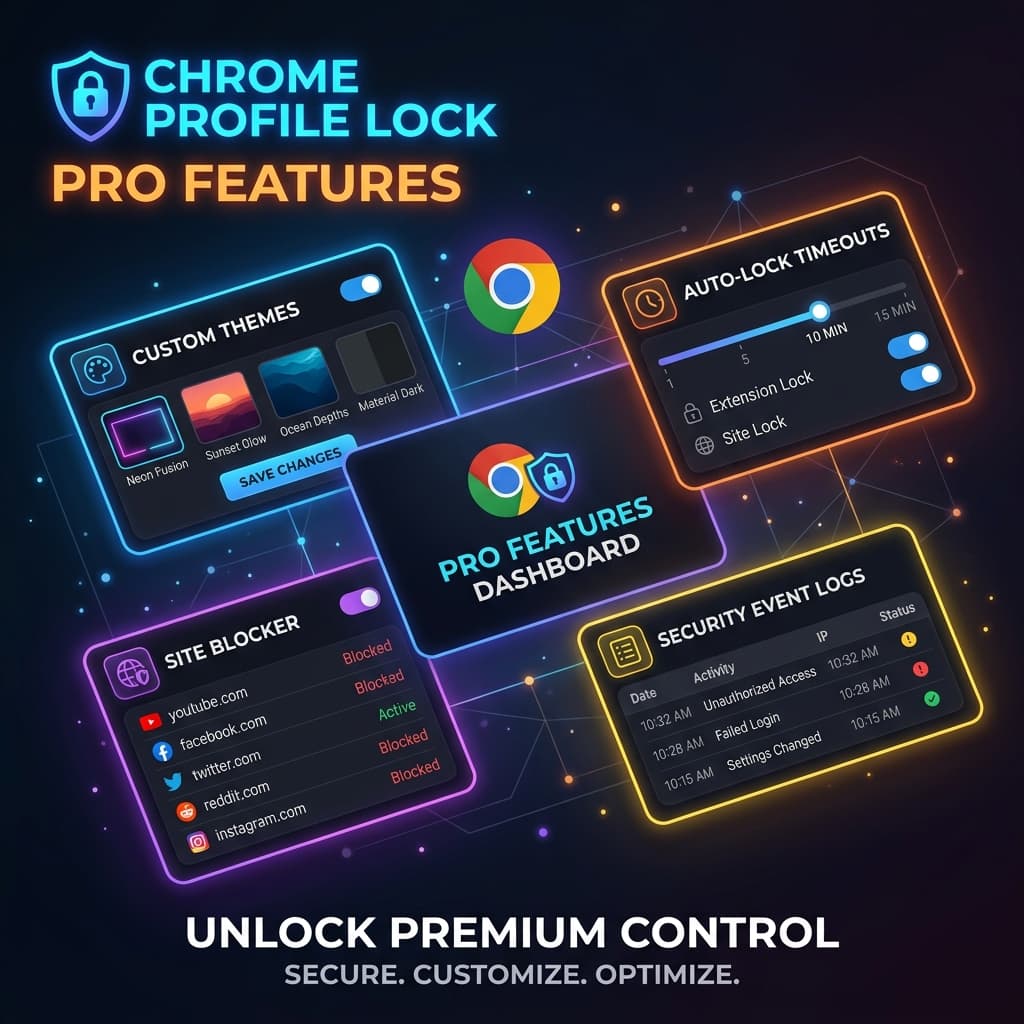
For users who need advanced browser security and customization, Profile Lock PRO introduces several premium features.
Premium Lock Screen Themes
Personalize your lock screen with professionally designed themes:
- Neon Fusion
- Sunset Glow
- Ocean Depths
- Material Dark
These themes allow users to create a lock screen experience that matches their style while maintaining strong security.
Custom Auto-Lock Timer
Different users have different security needs.
With Profile Lock PRO, you can configure inactivity timers anywhere from 1 minute to 60 minutes.
Examples
- 1 minute for high-security environments
- 5–10 minutes for office use
- 30–60 minutes for personal computers
This flexibility ensures protection that fits your workflow.
Advanced Website Protection
Sometimes you don't need to lock your entire browser.
Profile Lock PRO allows users to automatically protect access to selected websites.
Examples include:
- Banking portals
- Email services
- Social media platforms
- Company dashboards
- Internal business tools
This targeted security approach provides additional protection for your most sensitive accounts.
Security Activity Logs
Security visibility is essential for many users.
Profile Lock PRO includes detailed activity logs that track:
- Successful unlocks
- Failed password attempts
- Access timestamps
- Security events
These logs help users monitor browser security activity and identify unauthorized access attempts.
Who Should Use Google Chrome Profile Lock?
Profile Lock is designed for anyone who values browser privacy and security.
Ideal Users Include
- Students
- Remote workers
- Office professionals
- Freelancers
- Shared household computer users
- Public computer users
- IT professionals
- Small business owners
If you regularly access sensitive information through Chrome, Profile Lock can provide meaningful protection.
How to Set Up Google Chrome Profile Lock
Getting started takes only a few minutes.
Step 1: Install the Extension
Download and install Google Chrome Profile Lock from the Chrome Web Store.
Step 2: Create Your Password
Choose a strong password to secure your browser profile.
Step 3: Lock Your Browser
Click the extension icon and select Lock Profile Now.
Step 4: Customize Settings
Adjust:
- Auto-lock timers
- Password settings
- Security preferences
- Theme options
Step 5: Upgrade to PRO
Activate premium features instantly using your license key purchased through Gumroad.
Privacy-First Security Design
Unlike many browser extensions, Profile Lock is built with privacy as a core principle.
Security Features Include
- Encrypted password storage
- Chrome secure storage APIs
- Local-only data handling
- No third-party tracking
- No account registration
Your data remains under your control at all times.
Lightweight and Fast Performance
Security tools shouldn't slow down your browser.
Profile Lock is optimized for:
- Low CPU usage
- Minimal memory consumption
- Fast lock and unlock operations
- Smooth Chrome integration
- Reliable performance
You get strong protection without sacrificing browsing speed.
Why Choose Google Chrome Profile Lock?
Many browser security solutions focus only on passwords or only on privacy.
Profile Lock combines multiple layers of protection into a single easy-to-use extension:
✅ Password-protected browser access
✅ Automatic inactivity locking
✅ Full-screen security screen
✅ Website-level protection
✅ Offline privacy-first architecture
✅ Security activity monitoring
✅ Lightweight performance
Whether you're protecting personal accounts, confidential work data, or simply maintaining privacy on a shared computer, Profile Lock provides a practical and effective security solution.
Final Thoughts
As more of our lives move online, browser security becomes increasingly important. Your Chrome browser often contains access to emails, financial information, social media accounts, work tools, and private data.
Google Chrome Profile Lock helps protect that information by adding a secure password layer directly to your browser.
With features like password protection, automatic locking, website security controls, activity logs, and offline privacy protection, it's an excellent solution for anyone who wants greater control over browser access.
If you're looking for a simple, reliable way to secure your Chrome browsing experience, Google Chrome Profile Lock is a smart addition to your security toolkit.
Install Google Chrome Profile Lock today and take control of your browser privacy and security.
Install Google Chrome Profile Lock
Ready to secure your browser and protect your privacy?
Google Chrome Profile Lock is available now on the Chrome Web Store.
👉 Install the extension: https://chromewebstore.google.com/detail/google-chrome-profile-loc/bmbbfecnhkbkealeikkbejhjcnfmdjcn
With password protection, automatic browser locking, website security controls, and privacy-first offline protection, Profile Lock helps keep your Chrome session secure from unauthorized access.
Why Install Today?
- Protect your Chrome profile with a password
- Lock your browser instantly with one click
- Automatically secure inactive sessions
- Safeguard sensitive websites and accounts
- Keep all data stored locally on your device
- Enjoy lightweight performance with powerful security
Whether you're using a shared computer, working remotely, studying in a library, or simply want more privacy, Google Chrome Profile Lock gives you complete control over who can access your browser.
Download Google Chrome Profile Lock today and browse with confidence.